Loracta
Loracta — Living Archive Search · Ask · Translate · Publish · Govern

Every sermon, searchable — in every language your congregation speaks.

Your recordings, documents, publications, and media become one archive: searchable by meaning, answerable across supported languages, reviewable by your team, and traceable back to the source.

See it work ↓

Free 30-day pilot · from €69/mo

Ask the archive
Plain language · 100% cited
Ask anything across the archive — answered in plain language, with every claim traced back to its source.
I'm new to faith — what's a first step, and where do I start?

I can't speak for everyone's journey — but from our teaching I can point you to a few honest first steps, and show you where each one is taught.

Start by showing up

The first step is rarely a leap; it's turning up with your questions intact. Faith is taught as something you grow into through regular gathering, not a test you pass on day one.1

Read one Gospel, slowly

A common starting place is a single Gospel — often Mark — a few verses at a time, asking what it shows about Jesus rather than trying to settle everything at once.2

Find people, not just answers

First steps hold better in company: a first-steps group, a conversation with a pastor, a midweek table — somewhere you can return to and be known.3

Sources · 3 Trace to origin
01Sermon
Grace Haven ChurchMay 31, 2026
Come As You Are
You don't have to have it figured out to begin. Turn up with your questions intact — faith grows in the gathering.
Pastor John·audio · 31 min
02Teaching
Grace Haven ChurchApr 14, 2026
Reading Mark — First Steps
Take a single Gospel a few verses at a time. Ask what it shows about Jesus before trying to settle everything at once.
Teaching Team·study notes
03Pathway
Grace Haven ChurchMar 02, 2026
First Steps — Where to Begin
Faith holds better in company — a first-steps group, a midweek table, a conversation with a pastor.
Discipleship Team·guide
Ask a question…
§ 02  What makes it a living archive

Not a folder. Not a CMS. A living archive.

A folder stores files. A CMS publishes pages. A living archive connects material, meaning, language, permissions, and source, so your knowledge can be searched, asked, translated, cited, and reused.

01

It keeps growing

New recordings, documents, publications, media, and notes become part of the same searchable memory.

02

It understands meaning

Search finds related ideas even when the exact words differ, so nothing is lost to phrasing.

03

It works across supported languages

Transcripts, translations, and reviewed multilingual answers stay connected to their source.

04

It remembers its sources

Every answer, page, and quote can point back to the original material it came from.

One pipeline · source to answer or pageProvenance kept at every step
InputSource material
Stage 02Transcript
Stage 02bTranslation
Stage 03Tags & links
QueryCited answer
OutputAnswer or page
§ 03  Example archiveEU-hosted by default · Human review built in
Cited every time
Every answer traces to its source, by design
11
Supported languages
100%
Cited by design
EU-hosted
By default · data residency
Public site
Included · powered by the archive
Human review
Built into the workflow
IndexedRecordings, reports, publications, articles, and notes become one searchable archiveGrowing weekly
MultilingualAnswers can work across the languages your archive supports, with source kept intact11 languages
TracedEvery answer carries its provenance — exact page, paragraph, or timestamp100% cited
GovernedEU residency by default, with a full audit trail and human reviewEU · reviewed
§ 04  The shift

Your knowledge is already there. It just isn't answerable yet.

Most content-rich organizations don't have a content problem — they have a retrieval problem. Here is what changes the day the archive goes live.

Before LoractaScattered · siloed
  • Scattered drives
  • Recordings nobody can find
  • Reports used once, then lost
  • Translations separated from source
  • Knowledge trapped in staff memory
After LoractaSearchable · cited
  • +One governed archive
  • +Transcripts with timestamps
  • +Public knowledge sites from approved reports
  • +Reviewed translations kept with source
  • +Private workspace answers for staff
§ 05  Embed or launch

Put the archive where your audience already looks.

Keep the website you already have, or launch a public archive site from a template designed for your organization. Same archive, same permissions, same citations.

A.

Embed into your existing site

Existing site · API-ready
yourorganization.org/library
Annual Field Report 2023
⟨ Loracta embed ⟩
Searchsupplies into northern Syria
PDF · 14Audio · 6Video · 3Data · 2
  • Search box
  • Ask widget
  • Collection pages
  • Citation cards
  • Language switcher
  • API access
B.

Launch a public archive site

Public site · mobile-ready
First GenAboutArchiveVoicesEN·DE·FR
Edition Nº 04 · Berlin
What we carry does not end with us.
Collection
Youth pathways
Article
Apprenticeship access
Media
First application, first offer
Cited · multilingual · mobile-ready
  • Public archive site
  • Collection & article pages
  • Donation & campaign CTAs
  • Multilingual editions
  • Mobile-ready templates
  • Powered by the archive
§ 06  How it works

From scattered knowledge to a living archive.

Bring in what you already have. Your material becomes transcripts, translations, tags, links, and citations so people can search it, ask questions, and publish from it.

01Import

Bring in what you already have

Recordings, reports, PDFs, articles, videos, and whole collections — from the tools your team already uses.

Nothing has to be reformatted first — drop in a file or connect a source, and it joins the archive as it is.
PDF · DOCX · Audio · Video · Web
02Structure

Transcribe, translate, link

Your material is transcribed, indexed, translated, tagged, and linked, with human review where accuracy, tone, or publication quality matters.

Every step can stay reviewable, so the archive remains accurate as it grows.

Transcription · Translation · Tags
03Query

Search or ask across supported languages

People can search directly or ask the archive a question. Results can surface across original, transcribed, and translated material, with citations attached.

One index answers both ways, with source links returned alongside the result.

Search · Ask · Browse
04Publish

Publish from the same archive

Turn archive material into public pages, collections, citations, and multilingual knowledge surfaces without separating it from the source.

The same archive powers a public site, an embedded widget, or an API — wherever your audience already looks.

Sites · Embeds · APIs · Channels
§ 07  Search and ask

Search it like a library — or ask it like a colleague.

People get two ways into the same archive: search when they know what they need, and ask when they want the archive to explain, compare, summarize, or trace an answer back to source.

§ 08  Shared knowledge surfaces

Private archives. Shared knowledge surfaces.

Each organization keeps its own archive private, while approved collections, sources, or public pages can appear in shared spaces when collaboration calls for it.

Youth mentoring nonprofitProgram guidesMentor training · stories · local resources
Scholarship foundationApplication supportEligibility guides · deadlines · funding notes
Training providerCareer pathwaysCourse material · apprenticeships · referrals
Youth research partnerEvidence baseReports · datasets · evaluation notes
⊟ Permission gate
per collection
Shared surface Youth opportunity knowledge hub A common search and public resource site drawing only on material each partner has approved, with attribution preserved and withdrawal supported.
i.

Partner archives

Each youth organization, funder, training provider, or research partner keeps its own users, permissions, languages, and source material.

ii.

Shared surfaces

Approved material can appear in a common search, youth opportunity hub, campaign archive, or public consortium site.

iii.

Governed federation

Each organization controls what is shared, what stays private, and what can be cited publicly.

§ 09  Built for content-rich organizations

For organizations whose content is the work.

If your mission produces knowledge faster than anyone can find it again, that backlog can become an asset: searchable, reusable, multilingual, and source-backed.

Churches

01

Teaching, sermons, study guides, and service recordings made searchable for members and multilingual communities.

  • Sermons & series
  • Teaching & courses
  • Pastoral notes
  • Service recordings
For churches →

NGOs & civil society

02

Reports, campaigns, training material, and field evidence that stay reusable after projects end.

  • Reports & briefs
  • Campaigns & media
  • Testimony & interviews
  • Programme records
For civil society →

Research groups

03

Papers, interviews, datasets, and editorial notes tied back to their exact source.

  • Papers & preprints
  • Talks & lectures
  • Interviews & transcripts
  • Datasets
For research →
§ 10  Public archive output

Your archive can become a public knowledge site.

Not a separate website builder bolted on the side. Public pages come from the same archive your team uses internally, so collections, citations, translations, and updates stay connected.

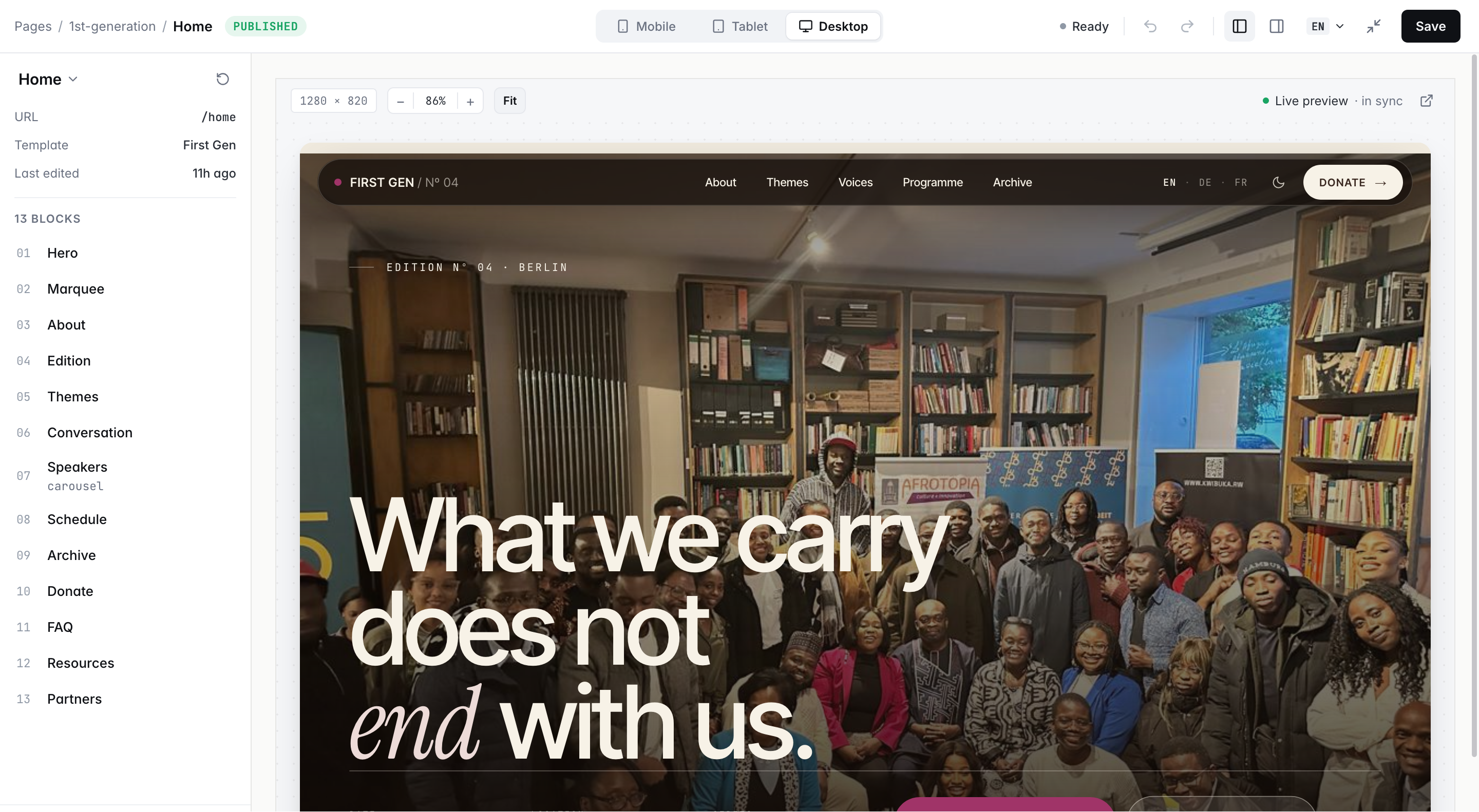
The editor next to the published page. Edit a block on the left, watch the live edition render on the right across mobile, tablet, desktop, and supported languages.

  • Collection & article pages
  • Source citations on every claim
  • Translated editions in sync
  • Donation & campaign CTAs
Fig. 03/Site editor · template + live previewLive Editor · Live preview · in sync
The site editor — block list on the left, a published 'First Gen' edition rendering in the live preview with mobile/tablet/desktop toggles and a language switcher.
A first-generation edition rendered in live preview while the block list stays in reach — published straight from the archive.
§ 11  Trust & governance

Built for material people rely on.

Trust here is operational: visible in every answer, every permission, every review step, and every export.

i.

How we prevent hallucinated answers

Answers are generated only from your indexed material, and every claim carries a citation back to its exact source — page, paragraph, or timestamp. An answer with no supporting citation is not shown as fact.

ii.

Human review

Editors approve transcripts, translations, and public outputs before anything ships.

iii.

Rights & permissions

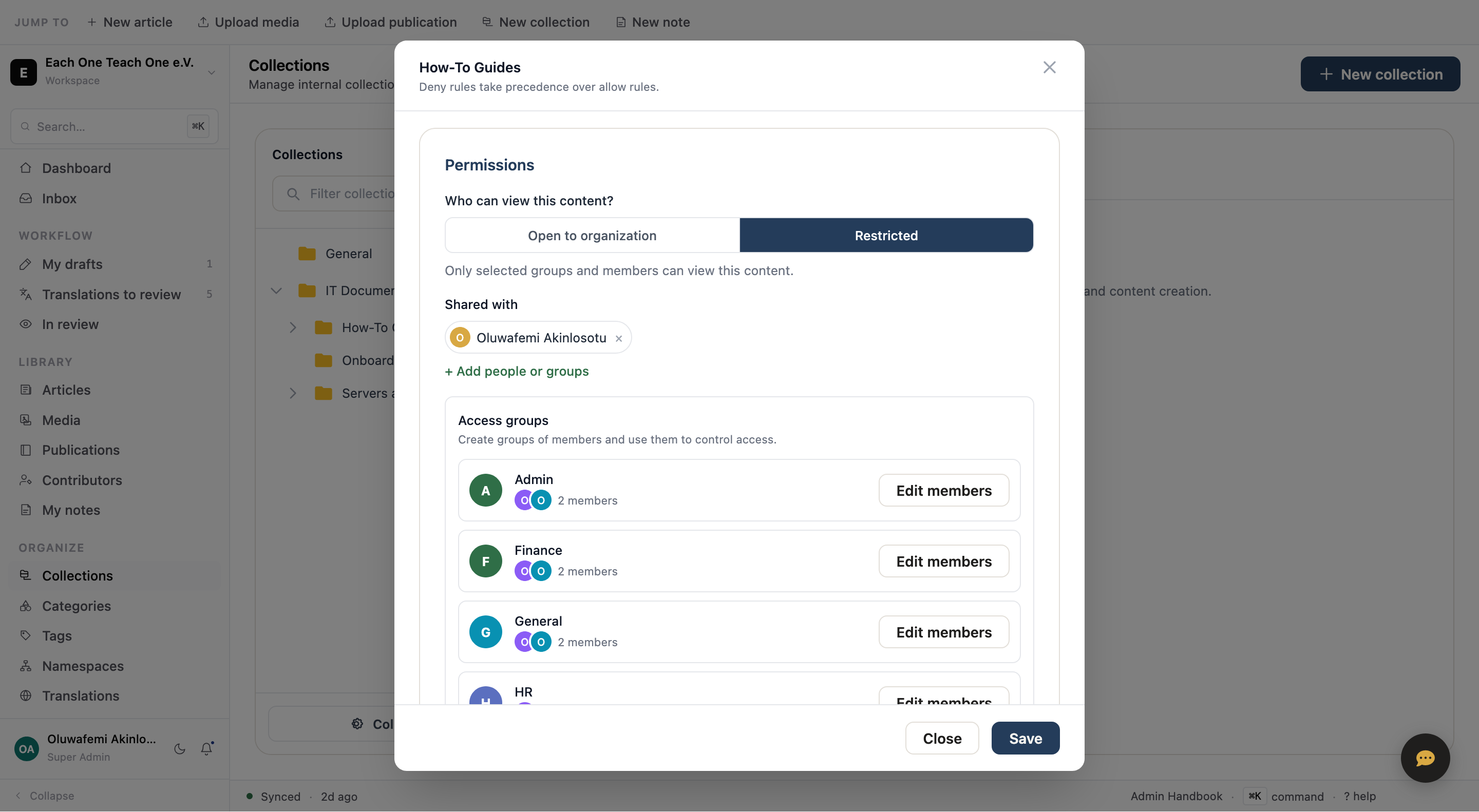
Restrict by organization, group, member, collection, or source. Deny takes precedence over allow.

iv.

EU residency & audit trail

EU-hosted by default, with privacy controls and traceable activity.

v.

Consent-aware public surfaces

Cookie settings, analytics gating, and public-page controls stay intact.

Fig. 04/Permissions · restricted access & groupsLive Restricted · access groups
Permissions dialog — content restricted to selected groups and members, with access groups for Admin, Finance, General, and HR.
Access you can see. Open to the whole organization, or restricted to named groups and members — set per collection, audited over time.
§ 12  Start30-day pilot · real corpus

Start with the archive you already have.

Bring a real corpus: recordings, documents, publications, media, notes, or teaching material. In 30 days, your team can test a searchable, multilingual, source-backed archive with real questions.

Talk to sales →